
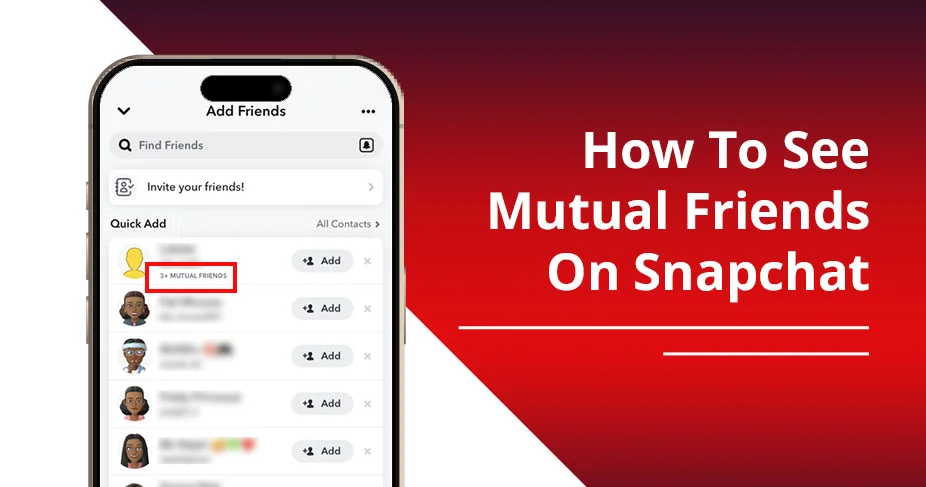
Snapchat’s friend system works based on how close a person is to you. For Plus members, a feature called Friend Solar System is offered, which places the most engaged users nearest and the least engaged users far away, in a solar system theme. As far as Mutual friends are concerned, the app provides you with a feature in which you can see the number of your friends who are common to that profile. Remember, only the number of mutual connections is shown, not the exact names of them. But, how to see mutual friends on Snapchat? This guide is written to cater to this in detail, so read on.
Key Points!
- To become friends on Snapchat, you can either search the username using app’s search icon, and tap ‘Add’ button or visit Quick Add section and tap ‘Add’ next to various profiles.
- The most common way to become friends is through ‘Quick Add’ feature. Visit your profile > access ‘Quick Add’ section > and choose from the list of profiles to add your friend.
- If you want to see mutual friends, you will find them in ‘Quick Add’ section only. You will get the number of mutual contacts, but not the profile name.
- Adding mutual friends can be beneficial for you, sharing a common thread between your friends.
Understanding Snapchat’s Friend System
On Snapchat, you can add someone as a friend and continue chatting, calling, and sending snaps. As many people are connected on Snapchat, there might be a scenario when someone you want to add is a mutual friend of your existing friend. That means the person might know the one you’re thinking of adding now. It’s called ‘Mutual Friend.’ To see the mutual friends, use the ‘Quick Add’ feature.
Other than mutual friends, there is another category of friendship called the Best Friend list. So, there are a total of 3 kinds of friendship named differently. Have a look at them quickly:
| Snapchat Friendship Term | Explanation |
| Friends | Users added to your friend list; interaction levels vary and are not necessarily frequent or reciprocal. |
| Mutual Friends | Contacts who appear as friends on both your and another user’s lists, indicating shared social circles. |
| Best Friends | Your closest friends based on the most frequent interaction (snaps/chats). You can add up to eight friends as BFF. |
How To See Mutual Friends On Snapchat (Step-By-Step Guide)
To see the mutual friend list, you should visit the ‘Add Friends’ section. Under the ‘Quick Add’ section, you will find how many mutual friends you have, 3+ mutual friends or more, without unveiling their names. Below is a simple go-to set of steps to find mutual friends.
- Open Snapchat and access profile.
- Directly visit the ‘Add Friends’ section.
- Under the Quick Add section, navigate to the particular profile and you will see the mutual friends numbers, such as +1 mutual friend.
Also Read :- How Long Does The Green Dot Stay On Snapchat
Why Can’t You See Mutual Friends?
In a nutshell, you can’t see the full list of mutual friends on Snapchat because the app prioritizes privacy, security, and authentic connections. Below are the common reasons why the mutual friend list is hidden.
- If the person has hidden their connections: It depends on the user. If they hide their connection in settings, you cannot find out their mutual friend list.
- App is not updated: A Difference in app versions can stop you from accessing the mutual friend list. This happens when you are running an older version of Snapchat.
- Network Error: Sometimes Snapchat may not work well due to a broken connection. The internet speed decides whether or not you can load Snapchat.
Read Also:- How To Tell If Someone Declined Your Friend Request On Snapchat
Tips to Grow Mutual Friends on Snapchat
The social circle boosts when you opt for mutual friends on Snapchat. Therefore, it becomes important that you grow mutual friends. Here is how you can do it:
- Sync your contacts:
- Visit the Settings.
- Tap ‘Contacts’
- And select ‘Sync Contacts’
- You will get suggestions to add them from your contacts who use Snapchat.
- Be More Active: If you remain active for a long time, interacting with friends on Snapchat by snapping, chatting, and doing more, it signals Snapchat to show you more suggested contacts to add to your friend list.
- Share Your Snapcode: To boost your mutual friend list on Snapchat, one option could be to share your Snap ID or Snapcode on other platforms. This will automatically boost friendship list as more and more users will add you to their Snapchat.
- Participate in Snapchat Groups: The best way to get more mutual added to your Snapchat account is to find a group and participate in that sincerely. This activity likely adds more mutual, and probably becomes friends in future.
Privacy & Safety Concerns of Mutual Friendship of Snapchat
Although it’s a smooth way to start interacting with each other and become best friends later using the Snapchat mutual friend list, there are also some risks involved through this method. Check below some tips and protect yourself from being one of the victims:
- Strangers contact: Since adding a mutual friend just takes clicking the ‘Add’ button next to someone’s profile under the ‘Quick Add’ section, that does not always mean the person will be known to you. A lot of strangers might show up as mutual, and adding them could be potentially risky.
- Younger Users at Risk: Minor users who are on Snapchat can be at risk of cyberbullying when they add someone just because a strange profile is seen as a mutual friend of their friends. Doing so may harm you, leaving your personal information disclosed to them.
- Limited Control Over Visibility: Even if your account is private, Snapchat can still show up as someone’s mutual connection. That is concerning for some users who no longer wish to be discovered and added by random Snap profiles.
Also Read:- How to Tell if Someone Has Snapchat Plus
Snapchat Vs Facebook Mutual Friends (Differences)
This explains the key differences between Snapchat and Facebook Mutual friends.
| Snapchat Mutual Friends | Facebook Mutual Friends |
| Shows only the number of mutual friends (e.g., “3+ mutual friends”). | Shows the full list of mutual friends with names and profiles. |
| Prioritizes privacy by hiding identities. | More transparent, lets you see exactly who the mutual are. |
| Mutual friends appear via Quick Add or Search suggestions. | Mutual friends are visible directly on a person’s profile. |
| Lets you hide from Quick Add in settings. | Limited control — mutual friends are usually visible. |
Frequently Asked Questions {FAQs}
Can I hide mutual friends on Snapchat?
Although you cannot stop Snapchat from showing your profile to someone’s Quick Add section, however, to some extent, you can prevent your profile from your app’s setting: visit Snapchat>tap Bitmoji or Profile>tap settings>tap see me in quick Add > finally toggle off.
Do mutual friends mean someone added me back?
On Snapchat, the meaning of mutual friends is that you and another person have friends in common. You both are friends of one common profile. That’s it.
Why do random people show up as mutual friends?
Primarily, the reason for a random mutual friend suggestion is the Quick Add and friend suggestion system of Snapchat. It happens when you’ve synced your contacts, privacy settings, and the algorithmic effect of Snapchat.
Is “Quick Add” based only on mutual friends?
Instead of showing mutual friends, the ‘Quick Add’ feature works based on community or groups you share with others, algorithmic push, and synced contacts.
Can You See Mutual Friends Without Adding Someone?
Yes, you can see the mutual friends without adding them as your friend. But, remember that Snapchat does not disclose the profile information rather, it will show you mutual contacts as +1 mutual friend, +4 mutual friends, etc.
Can I See Other People’s Friends On Snapchat
No, you cannot check out on others’ friends list on Snapchat. They have a strict policy to keep the their users’ information safe.
Is Snapchat Mutual Friend Accurate?
Yes, when you notice +1 mutual friend, +3 mutual friends on someone’s profile, that means 1 or 3 of your friends is connected to that profile – friends with that profile.
Conclusion
Snapchat is a popular tool in today’s social media ecosystem. It’s widely popular among gen z for sharing snaps, chatting, sharing stories, and doing more. Its interesting features like adding friends, showing mutual friends list, help discover new profiles easily. We saw how to see mutual friends on Snapchat in this guide, where we discussed the process to check if someone is a friend of your friends. This can be identified by visiting your profile>checking the Add friends section> and looking at the profile under the Quick Add icon. The mutual connection displays only how many profiles it shares a friendship with, not the exact name of the profile.