
The quickest way to tell if someone has Snapchat Plus is to open their profile and look for the black-and-white star badge next to their display name. If the badge isn’t there, look for other clues like Stories that stay up longer than 24 hours, a Post View Emoji in your chat, or an exclusive Bitmoji background.
The catch is that subscribers can hide the badge, so no single sign is 100% proof. Below, you’ll learn every reliable clue, what people with Snapchat+ can and can’t see about you, and how to hide your own subscription if you have one.
Quick Overview
| Sign | Where to Check | How Reliable? |
|---|---|---|
| Snapchat+ star badge | Next to their name on their profile | Strong, but it can be hidden |
| Story stays up past 24 hours | Their Story in the Stories tab | Strong |
| Post View Emoji after they open your Snap | Your chat list | Strong |
| Custom or AI-generated Bitmoji background | Their profile | Possible clue, not conclusive |
| Bitmoji pet or car on Snap Map | Snap Map | Possible clue, not conclusive |
| Custom chat wallpaper or chat color | Your shared chat | Possible clue, not conclusive |
Short answer: The star badge, a Story that lasts beyond 24 hours, and a Post View Emoji are the strongest clues. If you spot more than one, the person very likely has Snapchat+. Only the badge is direct confirmation, and only when they leave it turned on.
What Is Snapchat Plus?
Snapchat Plus (written as Snapchat+) is Snapchat’s paid subscription that gives you exclusive, experimental, and early-access features. It doesn’t change how Snapchat works at its core. Instead, it adds extra customization, friendship insights, and Story tools on top of the free app.
Some of the most popular Snapchat+ features include the #1 Best Friend pin, Story Rewatch, Custom Story Expiration, Peek a Peek, Post View Emoji, Bitmoji backgrounds, chat wallpapers, custom app icons, and the Friend Solar System. You can see the full, current list on Snapchat’s official Snapchat+ support page.
It’s also more popular than ever. In November 2026, Snap shared that its subscription offerings (Snapchat+, Lens+, Platinum, and Memories Storage Plans) had passed 30 million subscribers. So there’s a good chance a few people on your friends list are already paying for it.
How Much Does Snapchat Plus Cost?
In the U.S., the standard Snapchat+ plan has commonly been listed at $3.99 per month, with cheaper 6-month and yearly options. However, Snapchat says pricing varies by country and device, and the price you see in the app is the price you’ll pay. To check your exact price, open Settings and tap Snapchat+.
Snapchat also offers other plans in some regions:
- Snapchat+ Family Plan: Share the subscription with others.
- Lens+: Adds exclusive AR and AI-powered Lenses.
- Snapchat Platinum: Includes Snapchat+ features and removes Sponsored Snaps and Story or Lens ads. It launched at $15.99 per month in the U.S., though pricing may vary by region.
Important: The regular Snapchat+ plan is not ad-free. Only Platinum removes most ads. Many blogs get this wrong.
Snapchat Plus vs. Regular Snapchat: What’s the Difference?
The main difference is that Snapchat+ users get extra features that leave visible traces on their profile, Stories, and chats. Those traces are exactly what help you spot a subscriber.
| Feature | Snapchat+ (Paid) | Regular Snapchat (Free) |
|---|---|---|
| Profile badge | Optional star badge next to the name | No badge |
| Story duration | Custom expiration from 1 hour up to 1 week | Disappears after 24 hours |
| Story Rewatch | See which friends rewatched your Story | See who viewed it only |
| Peek a Peek | See a 👀 icon when someone half-swipes your chat | Not available |
| Post View Emoji | Pick an emoji friends see after you view their Snap | Standard “Opened” status |
| #1 Best Friend | Pin one friend as #1 BFF | Can pin chats, but no #1 BFF |
| Friend Solar System | See which planet you are in a friend’s Solar System | Not available |
| App icon, themes, and chat colors | Custom icons, themes, wallpapers, and chat colors | Default look |
| Bitmoji extras | Exclusive backgrounds, pets, and cars | Standard options |
| Snap replays | Replay Again lets you rewatch a Snap a second time | Standard replay limits |
| AI tools | Extra AI Creative Tools, AI Captions, and a custom My AI bio | My AI and standard AI Lenses |
| Ads | Still shows ads (unless you upgrade to Platinum) | Shows ads |
| Profile views | Can’t see who viewed your profile | Can’t see who viewed your profile |
How Do You Tell if Someone Has Snapchat Plus? 6 Signs
Start with the badge, then move down the list. The more signs you find on one account, the more confident you can be.
Sign 1: The Snapchat+ Star Badge Next to Their Name
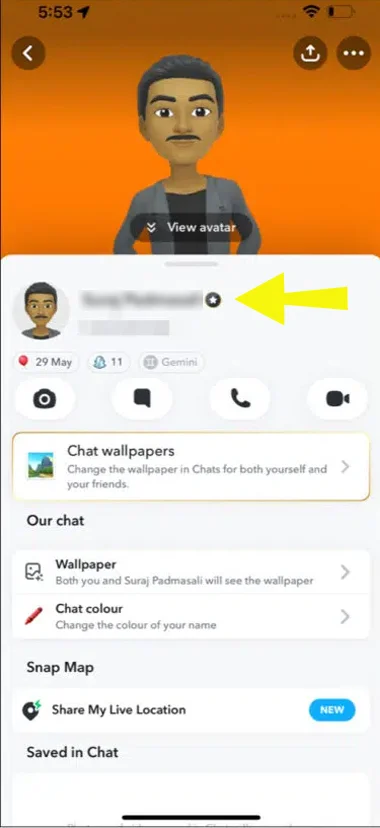
Open their profile by tapping their Bitmoji or name in chat. If you see a small black-and-white star badge right next to their display name, they have Snapchat+.
This is the clearest sign, but it has one big limitation. The badge is optional. Subscribers can switch it off anytime, so no badge does not mean no Snapchat+.
Don’t confuse it with the gold star. A gold star usually belongs to a Snap Star, which is a verified creator or public figure. That’s a different badge and has nothing to do with paying for Snapchat+.
Sign 2: Their Story Stays Up Longer Than 24 Hours
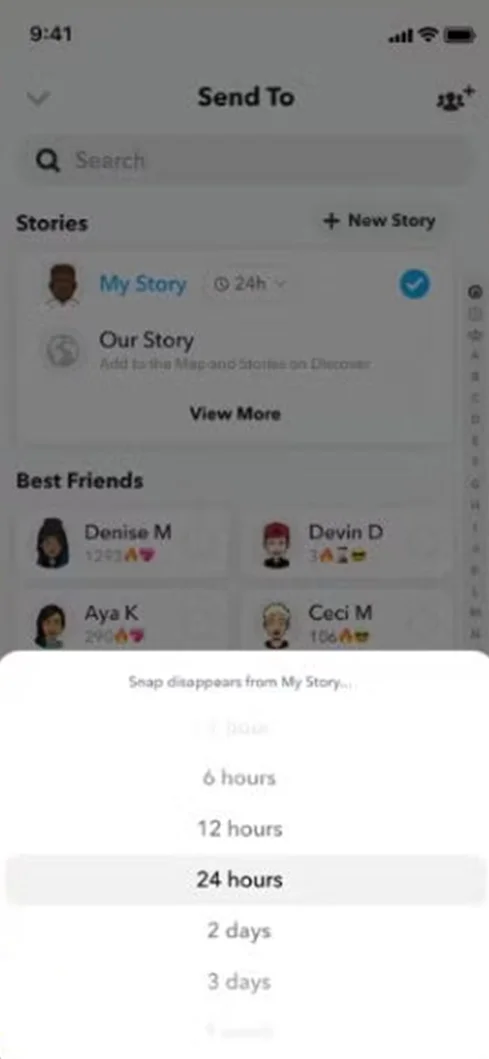
Regular Snapchat Stories disappear after 24 hours. With Custom Story Expiration, Snapchat+ users can set their Stories to last anywhere from 1 hour up to 1 week.
So if a friend posted a Story on Monday and you can still see it on Wednesday, they’re using Snapchat+. This is one of the most dependable “without the badge” signs because free users simply can’t do it.
One exception: Saved Stories and Spotlight posts on a public profile can stay visible much longer without Snapchat+. This sign applies to a regular friend Story in your Stories tab.
The reverse doesn’t work, though. If a Story disappears early, they might just have set a shorter timer, or they might have deleted it.
Sign 3: A Post View Emoji Appears After They Open Your Snap
Normally, when a friend opens your Snap, you see a plain “Opened” status. Snapchat+ users can choose a Post View Emoji that shows up next to their name in your chat list after they view your Snap.
If you keep seeing the same emoji, like a 🔥 or 💀, next to someone’s name after they open your Snaps, that’s a strong sign they’re a subscriber.
Sign 4: A Custom or AI-Generated Bitmoji Background
Snapchat+ users get access to exclusive Bitmoji backgrounds and generative (AI) profile backgrounds. If someone’s profile has a unique, detailed, or animated scene behind their Bitmoji that you can’t find in your own options, they likely have Snapchat+.
To compare, open your own Bitmoji background settings. If their background isn’t on your list and you’re a free user, it’s probably a Plus-only design.
Sign 5: A Bitmoji Pet or Car on Snap Map
Snapchat+ includes exclusive Bitmoji pet and car options. Open Snap Map and look at your friends’ avatars. If someone’s Bitmoji has a pet next to it or is sitting in a special vehicle, that’s a Plus feature.
This only works for friends who share their location with you, so it’s not useful for everyone.
Sign 6: Custom Chat Wallpapers or Chat Colors
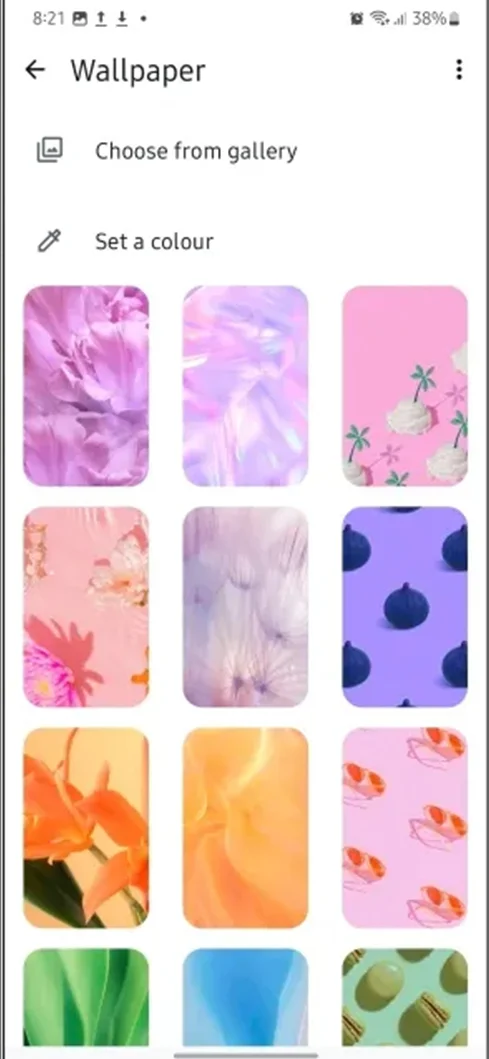
Snapchat+ users can set chat wallpapers, including AI-generated ones, and change chat colors. If a chat you share with someone suddenly has a new background that you didn’t set, the other person may have Snapchat+.
Ask yourself one thing first: did you change it? If not, it was them.
Weak Signs You Shouldn’t Rely On
Some clues get shared a lot online but don’t really prove anything:
- Replaying your Snap: Snapchat+ has a Replay Again feature that lets subscribers rewatch a Snap one extra time. But a replay notification on its own is a normal Snapchat action, so it isn’t proof of a subscription.
- A high Snap Score: Snapchat+ has a Snapscore multiplier feature, but a big score usually just means someone Snaps a lot. If you’re curious, here’s how Snap Score actually works.
- Using AI Lenses: Free users have My AI and plenty of AI Lenses too.
- Talking about a “new feature”: Snapchat+ gets early access, but features also roll out to free users in waves by region and device.
Can Someone With Snapchat Plus See When You View Their Profile?
No. Snapchat+ does not let anyone see who viewed their profile, and it doesn’t send a notification when you visit someone’s profile. This is the same for free and paid users.
That means a Snapchat+ user can’t see:
- That you opened their profile
- How many times you checked it
- When you viewed it or how long you stayed
- That you looked at their Snap Score or friends list
The confusion comes from features that sound similar. Snapchat+ users can see who rewatched their Story and who peeked at their chat, but those are different actions from viewing a profile. If you run a public profile, Snapchat may show total view numbers, but not the names of who viewed it. You can learn more in our guide on whether you can see who views your Snapchat profile.
Watch out for scams: Any app or website that claims to show “who viewed your Snapchat profile” is fake. These tools often try to steal your login details. Never enter your Snapchat password on a third-party site.
What Can People With Snapchat Plus See?
People with Snapchat+ get a few extra insights about how friends interact with them. Here’s what they can and can’t see:
| Can a Snapchat+ User See… | Answer |
|---|---|
| Who viewed their profile? | No |
| Who rewatched their Story? | Yes, with Story Rewatch |
| When you half-swipe their chat? | Yes, with Peek a Peek, if they’re on the Chat screen |
| When you’re in the chat with them? | Yes, with Friends in Chat, which shows your Bitmoji holding a phone |
| Which planet they are in your Solar System? | Yes, with the Friend Solar System |
| Who views their location on Snap Map? | No |
| What nickname you saved them as? | No, there’s no Snapchat+ feature for that |
| Your private chats with other people? | No |
Can Snapchat Plus Users See if You Half-Swipe Their Chat?
Yes, if they’ve turned on Peek a Peek. When you half-swipe to read their chat without fully opening it, they’ll see a 👀 emoji next to your name in their chat list.
There’s a catch. Peek a Peek doesn’t send a push notification, so they only see the eyes icon if they’re on the Chat screen while you’re peeking. Also, this feature tells a subscriber about your activity. Seeing it on your own phone doesn’t reveal whether the other person has Snapchat+. If you rely on the half-swipe trick, our guide on how to half swipe on Snapchat explains how it works and where it fails.
How Does the Friend Solar System Work?
The Friend Solar System shows where you rank among a friend’s top eight best friends. You’re the Sun, and your friends are the planets. Mercury is the closest spot (#1), and Neptune is the farthest (#8).
It’s based on how often you interact with that friend compared with everyone else, not on Snap Score. To see your planet, open a friend’s Friendship Profile and tap the Friends or Best Friends badge with a gold ring around it. For the full planet order and what each one means, read our guide to the Snapchat Solar System.
Note that the Solar System is usually turned off by default for new subscribers. You may need to turn it on under Profile > Snapchat+.
What Is the #1 Best Friend Pin?
Snapchat+ users can pin one friend as their #1 Best Friend, so that person always stays at the top of their chat list. If you’ve pinned someone and want to change it, here’s how to unpin someone on Snapchat without any fuss.
Can Someone Have Snapchat Plus Without You Knowing?
Yes. A subscriber can hide the badge and simply not use the visible features. If they keep normal 24-hour Stories, don’t set a Post View Emoji, and use default backgrounds, you probably won’t be able to tell.
Here are a few real-life scenarios:
- No badge, but their friend Story is 3 days old: They likely have Snapchat+ and hid the badge.
- No badge, but you see 🔥 after they open your Snaps: They likely have Snapchat+ with a Post View Emoji.
- No badge, default look, normal Stories: You can’t tell for sure. They may or may not subscribe.
The only 100% sure method is to ask them. Snapchat doesn’t show a list of who subscribes.
How to Hide Your Snapchat Plus Badge
If you have Snapchat+ and don’t want friends to know, you can turn the badge off in a few seconds:
- Open Snapchat and tap your Bitmoji in the top-left corner.
- Tap the Snapchat+ membership card.
- Find the Snapchat+ Badge option.
- Toggle it off to hide the star. Toggle it on again whenever you want to show it.
Hiding the badge doesn’t hide everything. If you use extended Stories, a Post View Emoji, or Plus-only backgrounds, friends may still figure it out. Switch those off too if you want to stay low-key.
Also, friends will still see when you view their Story, like any other user. If Story alerts are getting noisy on your side, you can turn off Snapchat Story notifications without unfriending anyone.
How to Subscribe to Snapchat Plus
Want to try it yourself? Here’s how to sign up:
- Open Snapchat and tap your Bitmoji in the top-left corner.
- Tap the Snapchat+ banner at the top of your profile.
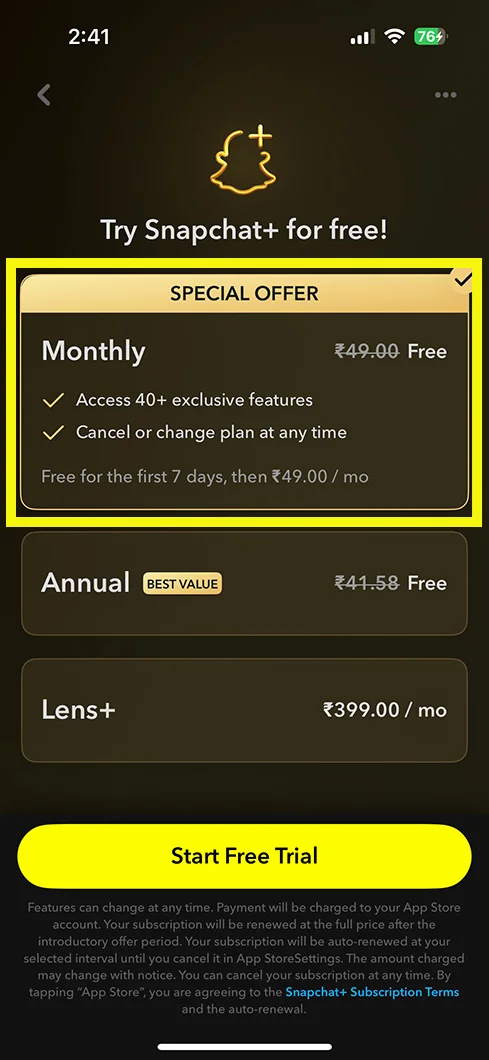
- Choose a plan, such as monthly or yearly.
- Check whether a free trial is offered in your region.
- Confirm the payment through the App Store or Google Play.
Features usually unlock right away. Some, like the Solar System and Peek a Peek, need to be switched on manually from the Snapchat+ menu.
Common Mistakes When Checking for Snapchat Plus
- Thinking no badge means no subscription. The badge can be hidden.
- Mixing up the Snap Star gold star with the Snapchat+ badge. They mean different things.
- Believing Snapchat+ shows profile views. It doesn’t, for anyone.
- Assuming Snapchat+ is ad-free. Only the Platinum plan removes most ads.
- Using third-party “Snapchat Plus checker” apps. They don’t work and can put your account at risk.
Frequently Asked Questions
Is there a way to tell if someone has Snapchat Plus without the badge?
Yes. Look for Stories older than 24 hours, a Post View Emoji after they open your Snap, exclusive Bitmoji backgrounds, or a Bitmoji pet or car on Snap Map. Stories that last longer than a day are the most reliable clue without the badge.
Will my friends know if I get Snapchat Plus?
Only if you show it. Snapchat doesn’t notify your friends when you subscribe. They might notice if you leave the badge on or use visible features like long Stories or custom backgrounds.
If someone has Snapchat Plus, can they see if I view their location?
No. Snapchat+ doesn’t show who viewed your location on Snap Map. Friends you share your location with can see where you are, but nobody gets a list of who checked.
What does the black star mean on Snapchat?
A black-and-white star next to someone’s name usually means they’re a Snapchat+ subscriber. A gold star usually means the account belongs to a Snap Star, which is a verified creator or public figure.
Can you see mutual friends on Snapchat with Snapchat Plus?
Mutual friends aren’t a Snapchat+ feature. Snapchat shows some mutual friend info in profiles and friend suggestions for everyone. Here’s how to see mutual friends on Snapchat step by step.
Can I cancel Snapchat Plus anytime?
Yes. Cancel through your App Store or Google Play subscriptions, or from Snapchat’s settings if you subscribed there. Your Snapchat+ features stay active until the end of your current billing period.
Final Thoughts
If you want to know whether someone has Snapchat Plus, check their profile for the star badge first. If it’s missing, look for Stories that last more than 24 hours or a Post View Emoji in your chat. Those two signs are the most reliable when the badge is hidden.
And if your real worry is privacy, relax a little. Even with Snapchat+, nobody can see when you view their profile or check their location. Just remember that Story views, Story rewatches, and half-swipes on a Plus user’s chat can still show up on their side.